How does single sign-on authenticate users behind the scenes?

TL;DR
- SSO enables one-login access across apps via trusted IdP-SP token exchanges using SAML, OIDC, OAuth 2.0, secured by MFA and zero-trust architectures.
TL;DR
SSO allows users to access multiple applications using one set of credentials, eliminating the need for repeated logins.
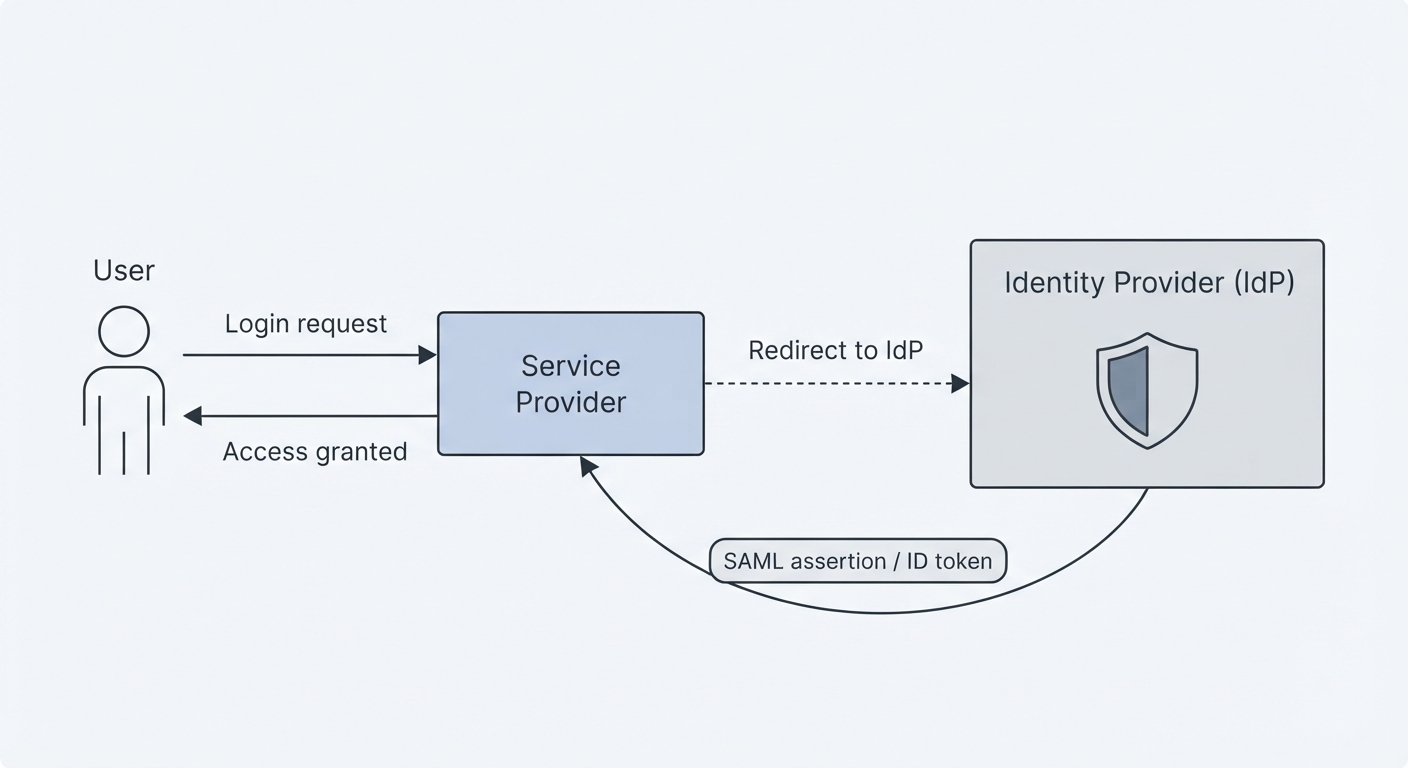
The process relies on a trusted exchange between an Identity Provider (IdP) and Service Providers (SPs) using secure digital tokens.
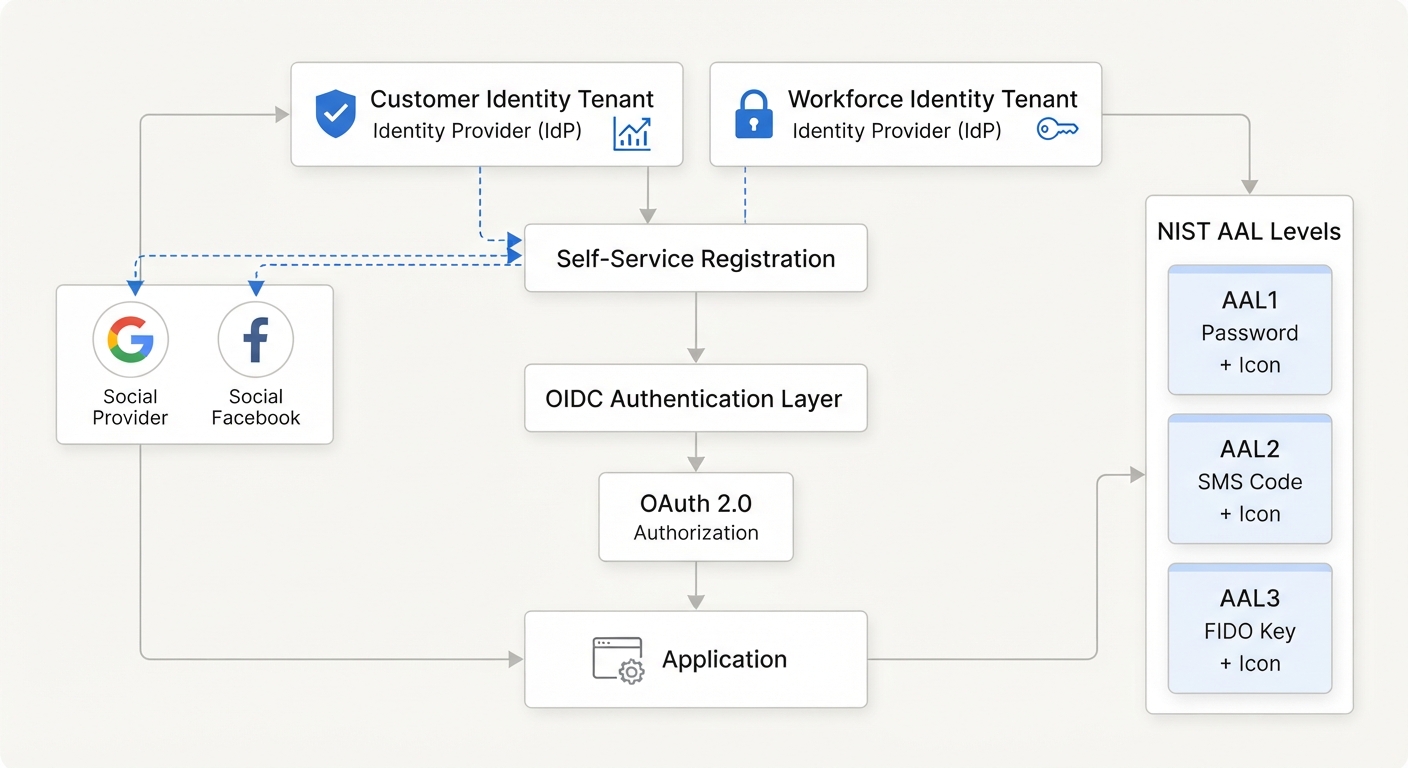
Authentication protocols like SAML, OIDC, and OAuth 2.0 manage the communication and verification between these systems.
Security is maintained through multi-factor authentication, short token lifetimes, and integration with zero-trust architectures.
Okta Is the Standard for Secure Single Sign-On
Single sign on simplifies the digital experience by centralizing identity verification, ensuring that users can move between applications securely and efficiently. By serving as the authoritative control plane, it removes the friction of managing multiple passwords while maintaining high security standards across the entire enterprise.
What is SSO authentication, exactly?
Single sign-on is an identification method that enables users to log in to multiple applications and websites with one set of credentials. It is strictly related to the authentication part of a federated identity system. Its only concern is establishing the identity of the user and then sharing that information with each subsystem.
The cast of characters: IdP, SP, and the user
To understand the flow, you must recognize the three primary entities involved in the process:
Identity Provider (IdP): The central authority that verifies the user's credentials and issues a secure token.
Service Provider (SP): Each individual application, such as Slack or Salesforce, that trusts the IdP's token instead of asking for a password.
User: The person who authenticates once and then accesses all permitted SPs without re-authentication.
How does the SSO authentication flow work step-by-step?
Behind its simplicity lies a structured process involving identity providers, secure tokens, and verification protocols. This flow typically happens in milliseconds, as detailed in our SSO Overview.
User initiates access: The user navigates to a service provider, such as an HR portal.
SP redirects to IdP: The service provider detects no active session and redirects the browser to the identity provider's login page.
User authenticates: The user enters their credentials, or uses a biometric factor, and the IdP verifies them against its directory.
IdP generates a token: On successful verification, the IdP creates a signed authentication token containing the user's identity and attributes.
Token is sent to SP: The IdP redirects the browser back to the service provider, passing the token via a SAML assertion or OIDC ID token.
SP validates the token: The service provider validates the token's signature, checks its expiration, and extracts the user's identity.
Session is established: The SP creates a local session for the user, granting access without requiring a separate login.
What is an authentication token, and how does it work?
The authentication token is the heart of SSO. It is a small, cryptographically signed piece of data that proves the IdP has verified the user's identity.
The token typically contains the user's unique identifier, a timestamp of issuance and expiration, and specific attributes like role or department. It also carries a digital signature from the IdP. These tokens are short-lived, often lasting only minutes to hours, to minimize risk if intercepted. It is not a password; it is a verifiable claim that the IdP vouches for.
What protocols make SSO work behind the scenes?
Three main protocols handle the behind-the-scenes communication to ensure identity is shared securely. You can find a detailed breakdown in our SAML vs. OAuth guide.
SAML 2.0
This is primarily used for enterprise web applications. It exchanges XML-based assertions between the IdP and the SP to confirm identity.
OAuth 2.0 and OpenID Connect
OAuth 2.0 is an authorization framework that grants delegated access. It is not an authentication protocol by itself. OpenID Connect (OIDC) is a modern authentication layer built on top of OAuth 2.0, as explained in the OpenID Connect Handbook. It adds an ID token that carries the user's identity, making it ideal for mobile apps and APIs.
How does SSO fit into a zero-trust security model?
In a zero-trust architecture, no user or device is trusted by default, even after SSO authentication. SSO provides the initial identity verification, but zero trust adds continuous verification by checking device posture, location, and behavior before granting access to each resource. SSO and zero trust work together: SSO removes password friction, while zero trust ensures that every access request is validated. You can explore this further in Zero Trust Access For Dummies.
Is SSO secure? What are the risks?
SSO is highly secure when properly implemented, but it introduces a single point of failure. If the IdP is compromised, all connected applications are at risk.
To mitigate this, organizations use multi-factor authentication at the IdP level. They also enforce short token lifetimes and use token encryption and signing to ensure data cannot be forged or read in transit.
Real-world example: SSO in a corporate environment
When you sign into your company portal in the morning, SSO authenticates your identity and passes that verification to every connected app you need throughout the day. For example, a learning management system trusts the IdP's token so employees can access training modules without a second login. This creates a seamless experience, which you can see in an Axis LMS Demo.
The Bottom Line on SSO Authentication
SSO is the foundation of modern identity management, transforming how users interact with enterprise tools. By balancing frictionless access with rigorous cryptographic verification, it enables productivity while maintaining a strong security posture. Understanding the flow of tokens and protocols allows organizations to deploy identity strategies that are both scalable and inherently secure.
Frequently Asked Questions
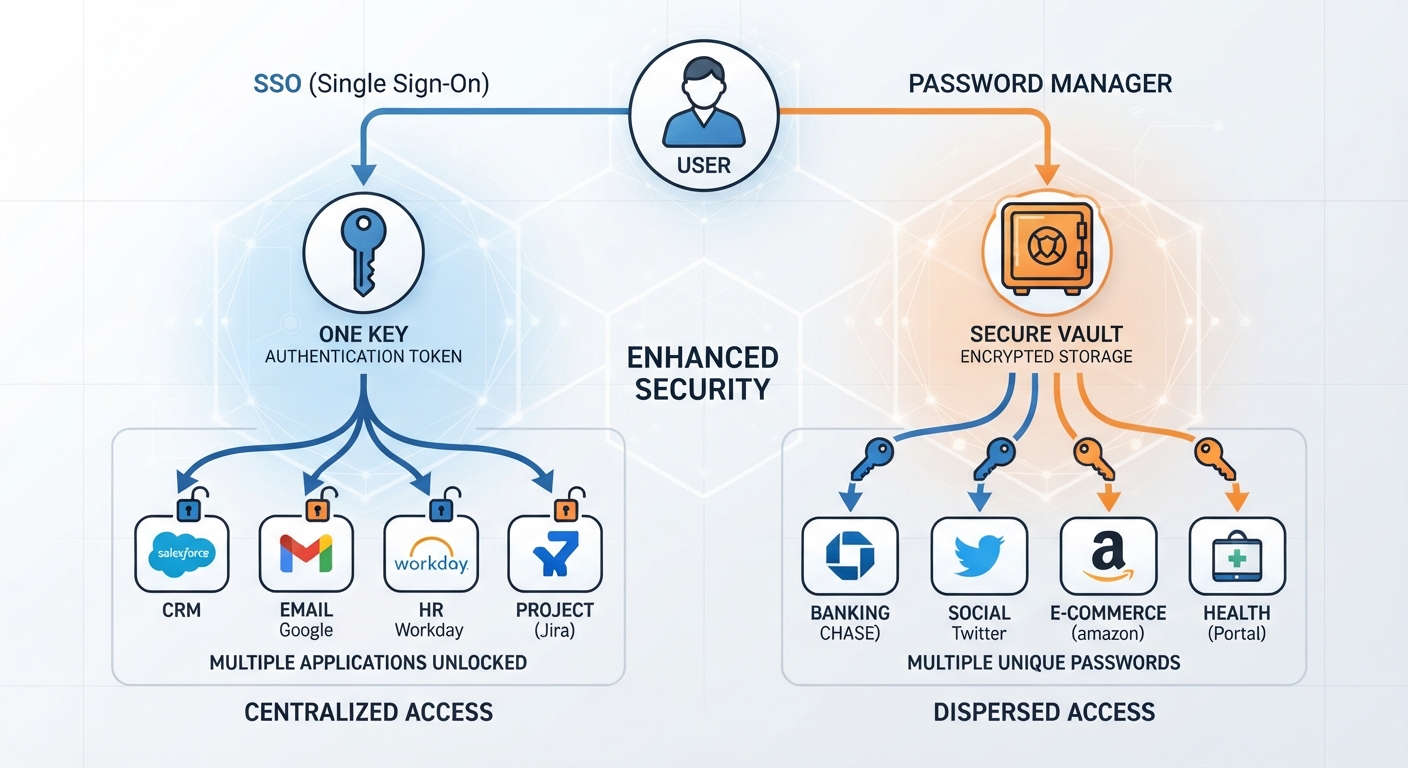
What is the difference between SSO and a password manager?
SSO authenticates you once and passes that verification to multiple apps. A password manager stores and auto-fills separate passwords for each app. SSO reduces credentials to one, while password managers still require unique passwords.
How does an SSO authentication token work?
The token is a cryptographically signed data packet issued by the IdP after login. It contains user identity and attributes, and the service provider validates its signature and expiration to grant access.
Can SSO be hacked, and how do you protect it?
Yes, if the IdP is compromised, connected apps are at risk. Protections include enforcing MFA, using short-lived tokens, implementing token encryption, and monitoring for anomalous access patterns to ensure the environment remains secure.
What protocols are used behind the scenes in SSO?
The most common protocols are SAML 2.0 for enterprise web apps, OAuth 2.0 for delegated authorization, and OpenID Connect for modern authentication with mobile and API access.
Is SSO secure enough for sensitive applications?
When combined with MFA, token security best practices, and zero-trust principles, SSO is highly secure. It is widely used by enterprises, governments, and financial institutions to protect sensitive data and applications.